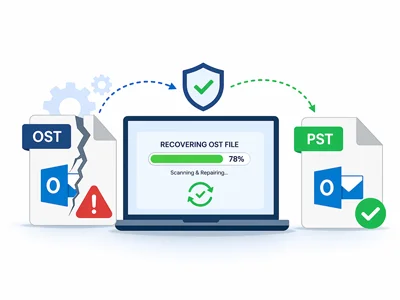
OST File is Corrupted or Inaccessible
Recover damaged or inaccessible OST files and convert orphaned OST to PST when the mailbox can’t be opened in Outlook.
Convert corrupted or inaccessible OST files to PST with full folder hierarchy and attachments. Recover orphaned Exchange mailboxes offline—no Outlook or live Exchange connection required. Works with Outlook 2021, Outlook 2024, Microsoft 365, and earlier Outlook versions.
Fix corrupted or orphaned OST files and export to PST, Office 365, Gmail, or MBOX. Use for migration, backup and archiving—supports Exchange OST repair and works offline without Outlook.
Available for Windows, Mac, and Linux. Pick your OS, then download or buy.
Supports Outlook 2021, 2019, 2016, 2013, 2010, 2007, 2003 & Office 365 OST Files
Watch the guided workflow, then follow the steps below.
Here are the steps to convert OST files into Outlook PST:
See why manual export can be risky and time-consuming compared to a dedicated recovery workflow.
| Scenario | Manual Method (Outlook) | Softaken Software |
|---|---|---|
| Data Risk | ❌ High (corruption chance) | ✅ Zero (safe workflow) |
| Outlook Required? | ❌ Yes | ✅ No |
| Orphaned/Offline Files | ❌ Not possible | ✅ Fully supported |
| Technical Skill | ❌ Expert required | ✅ Simple 4-step wizard |
Dealing with corrupted or orphaned Exchange stores can halt business operations. That's why our deep-scan engine parses the offline file sector-by-sector, ensuring complete mailbox recovery without relying on Exchange Server availability. Recover important emails even if the server is down or the OST is corrupted or orphaned. Fixes MAPI errors and IMAP/Exchange synchronization issues when Outlook won’t open the file. Unlike Scanpst.exe, this works on disconnected or inaccessible OST and exports to PST, MBOX, EML, or Office 365 and Gmail—with no data loss. Trusted in corporate settings.
Common scenarios where conversion becomes essential for data recovery and migration.
Recover damaged or inaccessible OST files and convert orphaned OST to PST when the mailbox can’t be opened in Outlook.
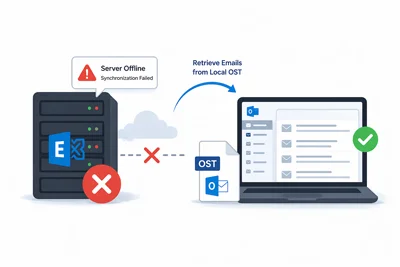
When Exchange Server synchronization fails or the server is offline, the utility retrieves emails from the local OST.
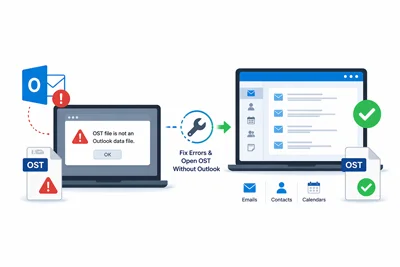
Fix "OST file is not an Outlook data file" errors and open OST without Outlook when the client won’t load the file.
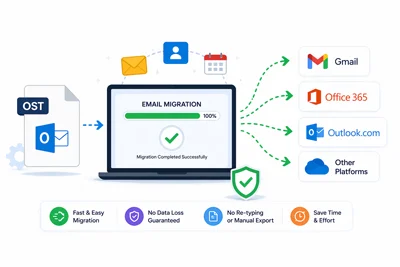
Move your emails to Gmail, Office 365 and other platforms without hassle—no re-typing or manual export.
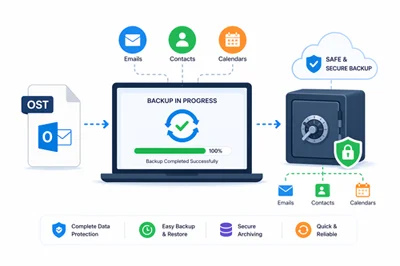
Tools create a safe backup of contacts, calendars and emails.
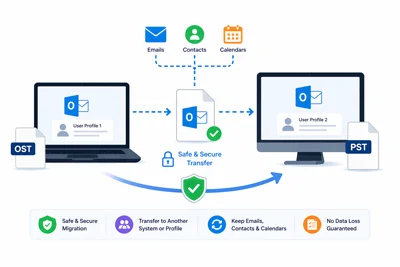
Safely transfer Outlook data to a different system or account
This tool is designed for a variety of useful applications:
Manage Exchange recovery and mailbox data from OST files with ease.
Convert emails to Office 365, Gmail or other platforms securely
Easily access orphaned or corrupted OST files without Outlook.
Keep email backup, compliance and archiving on track—without extra tools.
We see teams use it for compliance, recovery, backup and migration—same product, different jobs.
Offline recovery path used for migration, backup, and Exchange cutovers.
Everything you need to open, recover, and export OST mailboxes—organized by recovery, integrity, and advanced tools.
Open OST offline, convert to PST and other formats, and choose exactly what to export.

There is no requirement to install MS Outlook to perform the conversion. Users can Open Outlook OST file without having Outlook. The software is independent to work alone and once OST file is scanned, the tool provides an instant preview of Offline OST items. From there, a user can right click on any message and save it in HTML/MHTML format to view any of the web browsers. Similarly, contacts are saved in vCard format and calendars in ICS format
This tool for OST to PST Conversion perfectly migrates all items inside the OST file like email messages, notes, contacts, tasks, etc. to PST format. Apart from this, you can use this app to export OST file to MBOX, MSG, PDF, EMLX, NSF, Office 365, HTML and TGZ. Without any inconvenience, the app exports OST mailbox data to these known formats in just a few clicks.

The OST File Exporter is easy to handle and there is no need of technical expertise to export Offline .ost file into .pst format. Users when load OST file and get preview of OST file. At that time, users are provided with options to export selective items or complete OST file into personal storage table format. Some simplified clicks are needed to perform the migration. Moreover, users will get these options separately to choose complete or desired folders from OST file for migration.

There are no worries if you have a password protected Outlook data file. The OST to PST software works in a simplified manner and export complete mailbox items without any trouble. The users will not face any issues and any data harm while exporting OST file into PST format. 100% accuracy is maintained during the export process. Users can save the conversion results by creating a new PST file on their local system.

The users have full freedom to export any size OST file. Free OST to PST converter supports any large size OST file. Plus, users have the facility to exclude blank folders from the list of conversion. For this, the users need to enable 'ignore empty folders' option and this will not affect the folder hierarchy and you will find results after excluding empty folders. In this manner, extra items can be easily removed from OST file and hence the conversion task be performed without any extra efforts.

Once OST file is being scanned by the application, the users will get complete mailbox preview where all folders inside OST file are shown on the left side of the wizard. A user can tick mark required folders from there. In this way, a user can perform the required items conversion in a safe and quick manner without any hurdles. Plus, a user can save the exported items to their defined location without any disturbance and losses.
Keep metadata, language, and folder hierarchy intact across Windows and Outlook versions.

Safety of data is one of the essential features during migration of OST files into PST format. The software takes care of it and perform the conversion in a proper way. It keeps all metadata items intact as original. To, cc, subject, bcc, attachments and the formatting applied to the emails are maintained properly. The original language of the data is duly preserved by the utility. Overall, security of data is on the topmost priority.

There will be no changes in the internal hierarchy of emails or folders while users convert .ost file into .pst and other formats provided by the tool. The application makes the conversion by organizing all data in a sequential manner as it was earlier before the conversion. No folder is missed and misplaced during the migration of offline storage table OST into PST format. You can say, the software is a trusted one app on which users can rely to export offline OST to PST format.

The OST File Conversion software can be easily downloaded on all versions of Windows such as Windows XP, Vista, 7 and higher versions. There is no effect on the processing by this tool even you are running other tasks in the background on your desktop. The application doesn't disturb other tasks and it will not affect the speed of the conversion.

Softaken OST to PST converter provides complete support to all major versions of MS Outlook. After successful conversion from OST file, a user can import PST file into MS Outlook 2019, 2016, 2013, 2010, 2007, 2003. Without any trouble, you can read PST file on all editions of MS Outlook. The migration can be easily carried out in the absence of Microsoft Outlook and users can pick any file format to save OST file from the available formats.
Filters, batch runs, attachment extract, calendars, contacts, and address harvesting.

Once the OST file is loaded and displayed on the software screen, the users can pick items from OST file for conversion. Apart from that, users can filter the database more deeply with the Advanced filter options. Here, users can filter the database according to date range i.e. by specifying a start date and end date to export OST database to PST & multiple formats. Users can also filter the database according to subject, from, to, etc. and simply apply the filters. By these, the only required database can be exported from OST file.

OST File Exporter is capable to extract only email addresses of multiple OST files at a time. A separate text file will be created to save email addresses of every OST file. The tool itself ignores duplicate email addresses of each file. There is an option 'include sent item folders' by which one can voluntarily include or exclude email addresses of sent folders. There is no damage and misplacement of any email address during the extraction process with this risk-free application.

This offline folder recovery tool lets users export multiple OST files, with options to extract attachments from those files. All the selected OST files—complete database or required folders—are exported as per user requirements. The application follows those instructions closely. Attachments and email formatting stay preserved with OST emails. Users never have to worry about data corruption, truncation, or misplaced attachments.

Batch OST Converter ensures secure, sandboxed local processing without external dependencies. Using the folder mode, it is possible for users to convert multiple OST files in a single attempt. A user can export OST files of every size. Irrespective of file sizes, the utility deals with OST files of various sizes. There is no effect on the tool's performance due to the number of OST files. Its working efficiency remains the same whether you export a single OST file or multiple OST files.

The application provides users the option to export calendars of OST files into ICS format. It is a universally accepted format for saving calendar entries. Apart from it, users can save calendars to MSG format to directly import OST calendars in MS Outlook. The MSG file having calendars can be simply imported to all MS Outlook editions. After providing the instructions to the application, it hardly takes few minutes to convert OST File calendars into ICS and MSG formats. In this manner, users can access OST file calendars to Thunderbird, Apple Mail, and other applications.

Softaken OST to PST file converter exports Address Book of OST into CSV and MSG formats. By exporting OST contacts into MSG format, these contacts can be easily imported to Microsoft Outlook application. Moreover, CSV file format is supported by various applications like Lotus Notes, Thunderbird, Apple Mail, Gmail, Yahoo, etc. In this way, OST contacts can be easily accessed on various platforms. Users can export unlimited contacts from OST file and with some clicks, the OST contacts are ready in CSV format whom they can access cloud-based and various desktop applications.
Expert recognition and trust signals for Softaken OST to PST Converter.

We take your data safety seriously. Softonic has thoroughly scanned our installer and confirmed it’s completely clean and safe for your system.
View Softonic Report
Our tool is built for one job: conversion. Software Informer’s expert editors have verified that there are no hidden trackers or annoying bundles included.
Check Editor’s Review
Recognized for its lightning-fast performance, WeSuggest highlights our tool as a go-to solution for exporting OST files without needing Outlook installed.
Read Softaken customer testimonials
With a solid 4-star rating on Download.com, we are proud to be a community-favorite for reliable and accurate mailbox migration.
Read User Ratings
Customer happiness is our biggest win. This award reflects our commitment to making complex data migration simple and stress-free for everyone.
View Award DetailsHow OST to PST conversion works—add file, scan, preview, convert. No Outlook required.
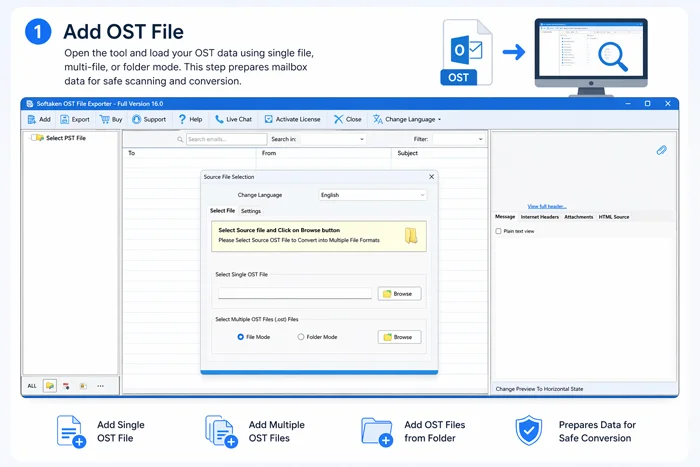
Open the tool and load your OST data using single file, multi-file, or folder mode. This step prepares mailbox data for safe scanning and conversion.
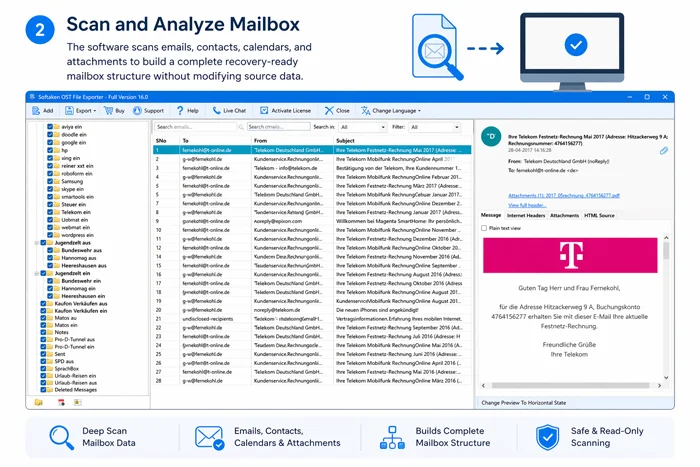
The software scans emails, contacts, calendars, and attachments to build a complete recovery-ready mailbox structure without modifying source data.
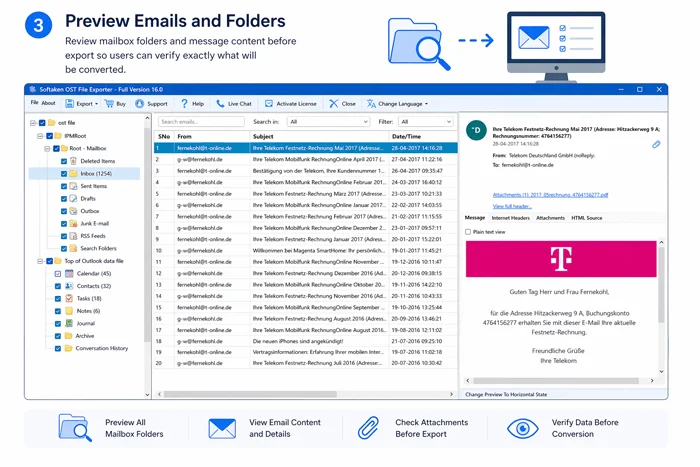
Review mailbox folders and message content before export so users can verify exactly what will be converted.
Choose output format such as PST, MBOX, EML, or Office 365 migration, apply filters, and click Convert to save mailbox data in the required format.
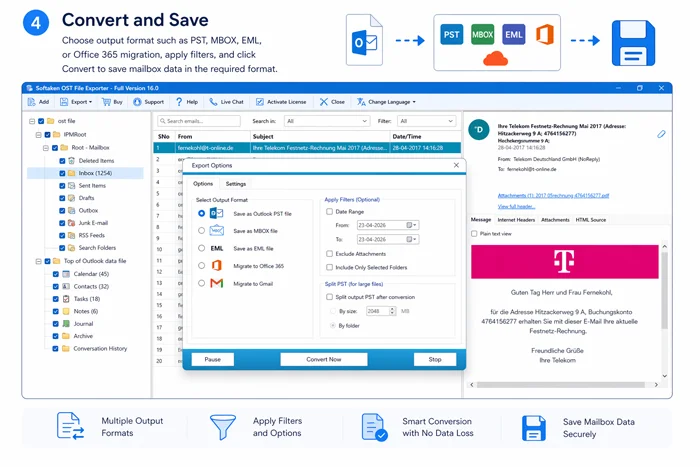
Primary target is Outlook PST. Also export desktop mail, documents, contacts, and cloud / IMAP destinations used for migration and backup.


mail.nsf / name.nsf from Outlook OST data.A quick performance and feature comparison to help you decide faster.
| Features | Softaken | Other Brands (Generic) |
|---|---|---|
| Conversion Speed | ✅ Fast | ❌ Slow |
| Attachment Handling | ✅ Embedded attachment support | ❌ Partial or inconsistent |
| Large File Support | ✅ 150GB+ tested | ❌ Often unstable on large files |
| Customer Support | ✅ 24/7 | ❌ Email only / delayed |
This comparison focuses on practical migration performance and enterprise readiness.
Windows 11, 10, 8, 7 + Outlook (32/64-bit)
Supports 150GB+ ANSI and Unicode OST/PST files—verified in enterprise migrations
Migrate in 20+ file formats PST, MBOX, EML, MSG, Office 365 and more
From 49 USD
| Specification | Details |
|---|---|
| Version | 16.0 (latest) |
| Installer Size | 18.3 MB |
| License From | 49 USD |
| Size Support | Up to 150GB+ (Tested) |
| Outlook Versions | Office 365, Outlook 2021, 2019, 2016, 2013, 2010, 2007, 2003, 2002, 2000 |
| OST File Types | ANSI and Unicode (Compressed & Encrypted) |
| Conversion Speed | Approx 1GB per minute (standard speed) |
| OS Supported | Windows 11, 10, 8, 7; macOS; Linux |
| Free Trial | 30-day trial · exports up to 10 items (full mailbox preview available) |
Organizations and enterprise teams worldwide rely on Softaken email migration and conversion solutions for mailbox workflows.
Trusted by 50,000+ IT Admins worldwide.
Check More Clients











Brand marks are shown for recognition of organizations that have used Softaken products; engagement and use cases vary.
Built for high-integrity recovery: read-only on source OST, local processing, and faithful mailbox mapping.
Most people worry about the original file getting corrupted during recovery or conversion. We remove that worry by opening your OST in read-only mode. The tool builds what is essentially a mirror of your data in a new PST—without rewriting or modifying the source file on disk. Your original OST stays exactly as it was.
Mailbox data is sensitive—we know that—so our design keeps it local. Privacy isn’t a bolt-on; it’s how the product is built. Unlike browser-based converters, the whole job runs on your PC: nothing is uploaded to our servers, shared, or passed through third-party APIs. Your machine is the only environment that ever handles the file.
When you migrate or archive, the message body alone isn’t enough. We map the details that matter—To, CC, BCC, and precise timestamps—into the new PST. Folder hierarchy is carried over carefully so the export still feels like your original mailbox, not a flattened dump of messages.
Field recovery, internal stress tests, and long-running product trust—same results users ask for.
Our support team recently helped a client recover a 170GB orphaned OST file that other tools couldn’t open. This software handled it in under 3 hours—full folder structure and attachments intact.
Our team tested this with a 150GB corrupted OST file and it completed conversion in approximately 90 minutes with full folder hierarchy and attachments intact. No Outlook or Exchange connection required.
Since 2015, Softaken has been delivering email migration and recovery solutions. Trusted for secure mailbox recovery and compliance backup by IT professionals worldwide.
Keep this checklist handy before you start conversion.
%localappdata%\Microsoft\Outlook (e.g. C:\Users\<you>\AppData\Local\Microsoft\Outlook).Client feedback from Softaken customers who recovered OST mailboxes and exported to Outlook PST.
MSP · Orphaned 80GB OST recovery to PST · Windows 10 / Microsoft 365
Recovered our 80GB orphaned OST cleanly with folder hierarchy intact. Took around 45 minutes on our workstation, but finished without errors. A slightly refreshed UI would make it 5 stars.
Clean recovery with folder hierarchy intact
UI could use a slight refresh
System Engineer · Department OST batch migration · Windows Server 2019 / Outlook 2019
Batch conversion saved hours when we migrated our department. Handles huge mailboxes without a hitch.
Batch conversion on large mailboxes
IT Admin · Corrupted OST recovery to PST · Windows 11 / Outlook 2021
Recovered all emails from a corrupted OST. Very easy to use.
Recovered corrupted mailbox quickly
Tested and Recommended by IT Administrators for Enterprise-level Mailbox Migration. Quick answers below on safety, data loss and conversion.
Softaken OST to PST Converter runs entirely on the OST file: no Outlook profile, no Exchange session, no MAPI connection. Four stages: load, deep scan, preview, export.
Full cutover, legal-hold subsets, or one-off recovery—all follow that same workflow. For Outlook-native workarounds and admin context, see our how to convert OST guide.
On Windows, Outlook OST files are typically stored at %localappdata%\Microsoft\Outlook.
Full path example: C:\Users\<you>\AppData\Local\Microsoft\Outlook. Softaken can open the OST from that folder without Outlook or Exchange.
OST to PST conversion is the process of converting Outlook OST files to PST format for convenient backup and access.
It contains emails, contacts, calendars, attachments and other mailbox data.
You require the conversion of OST to PST for the purpose of data recovery, migration, and backup.
You get your mail back after a crash, corruption or a big upgrade—without fighting the server.
Yes—we focus on badly corrupted OST files and heavy recovery scenarios.
Recovery mode plus deep scan pull out as much as we can from a bad file. For troubleshooting, see fix OST corruption /open OST without Outlook.
No, there is no restriction on the size of the file when converting from OST to PST.
Large OST files may be converted without any limitations.
Yes—folders and subfolders stay in order while you convert.
All emails, folders and subfolders remain unaltered.
Batch conversion is available in the Business and Enterprise modifications.
Simultaneously processing multiple files is feasible.
The software is capable of converting encrypted or password-protected OST files.
Available for Windows, Mac, and Linux via the download picker on this page.
You can export to PST, MBOX, EML, MSG, PDF, HTML and more—pick what fits your workflow.
No, you don’t need Outlook installed. We know how frustrating it is when the Exchange server is down and you can’t access Outlook—that’s why our tool works completely standalone.
OST files are used to store offline Exchange data, whereas PST files are portable Outlook data files.
PST files are simpler to backup and transmit. For further information, consult our guide on the differences between OST and PST.
Yes. The software is completely secure and data-safe; it operates on a copy of your file and does not alter the original OST.
Our featured customer quotes on this page are all 5★; money-back guarantee; used by IT professionals and enterprises worldwide.
Emails, attachments, contacts and calendars are exported without loss of data integrity during the conversion process.
Even from corrupted or deserted OST files, the advanced recovery mode extracts the maximum amount of data.
Yes. IT teams stick with us for a 99.9% recovery success rate when migrations go sideways—plus day-to-day recovery, backup and archival.
Backed by 24/7 support and a money-back guarantee.
The free demo includes a 30-day trial window and exports up to 10 items so you can preview conversion quality before buying.
Full mailbox preview is available in the demo; only the export count is limited. Unlock unlimited export with a full license.
Still have questions? Contact our 24/7 support or try the free trial today!
Download the free demo, then upgrade to a full license from $49 when you are ready. Includes lifetime license and free 24/7 support for all active users.
Available for Windows, Mac, and Linux. Pick your OS, then download or buy.
