
Softaken MSG to VCF Converter

MSG to VCF Converter

Capable MSG to VCF Converter Tool to migrate Outlook MSG Contacts to vCard effortlessly

(Average Rating 4.8Based on 151rating)
Standalone conversion:migrate single or batch Outlook MSG contacts to vCard — no MS Office installation required. Create an individual VCFfile for each MSG.
Windows only (7 / 8 / 8.1 / 10 &others). Not a macOS app. Supported with MS Outlook editions 2003,2007,2010,2013 and 2016 MSG contacts.
  • Migrate single as well batch Outlook MSG to vCard at fast speed
  • Standalone conversion program,requires no installation of MS Office to perform conversion
  • Capable to convert individual VCFfile for each MS Outlook MSG file
  • Manage to export both ANSI &UNICODEOutlook .msg
  • Convert any size file,no file size limitation
  • Run smoothly on all the major Windows including 7/8/8.1/10
  • Allows Outlook users to view their contacts on multiple email clients
MSG ContactsvCard / VCFAdd File / Add Folder
Demo converts 10 MSG contactsto VCF. Full license unlocks unlimited contacts from $29.
WindowsNo MS OfficeBatch FolderIndividual VCFANSI &UNICODEComplete Contact Data

Outlook MSG Contacts to vCard


MSG Contact FilesSoftaken (Windows Standalone)VCF / vCard

Watch MSG to VCF ConverterDemo


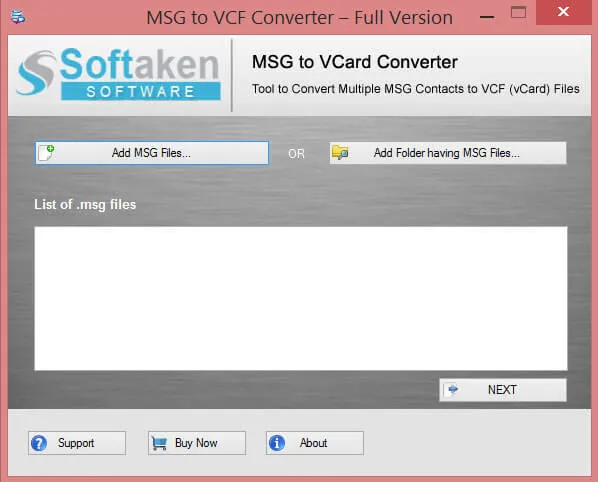
Add MSG files or folder,convert to VCF

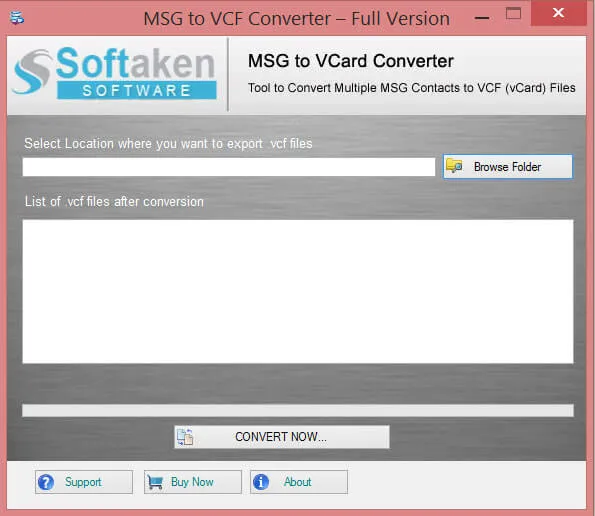
See Softaken MSG conversion workflow on Windows:browse MSG contacts with Add MSG file or Add folder,review the list,choose an export location,and convert to vCard.

  • Browse MSG files using Add MSG file or Add folder button
  • Get list of added MSG files and continue
  • Choose a location to export VCF files
  • Convert Now — no MS Office required

See the MSG to VCF ConverterInterface


Add MSG file or folder in Softaken MSG to VCF
1

Add MSG File or Folder

Browse MSG files using Add MSG file or Add folder — batch conversion exports an entire folder at one go.

List of added MSG contact files
2

Review Added MSG List

Get the list of added MSG files,then continue — convert one by one or multiple files at a time.

Export MSG contacts to VCF destination
3

Export VCF Files

Choose a location and Convert Now — each MSG can create a separate VCF with similar file naming.

Free Demo converts 10 MSG contacts. Full license unlocks unlimited conversion (from $29). Guide:user steps· demo video.

MSG to VCF (vCard) ConverterSoftware Features


two different modes
Support Conversion in Two Different Modes

MSG 2 VCF is a smart conversion program,gives users the flexibility to convert data one by one or at a time. The batch conversion is suitable when you want to export entire folder at one go. The feature makes conversion speed super-fast.

complete contact conversion
Conversion of Complete Contact Data

Your Outlook contact carries not only name and address but also phone number,website address,images,activities and much more. The MSG to VCF is capable to export complete contact data with just a few simple steps.

separate VCF file
Create Separate File

For each MSG file,MSG to VCF allows to create a separate file. Each MSG file has its details,the VCF file is saved with similar file naming. This will help you to view contacts separately and make their sharing easier.

any size MSG files
Freedom to convert any dimension MSG file

With MSG to vCard Converter,you have the full freedom to convert any size Outlook MSG file without any hurdles on the way. The utility doesn't take much time to carry out the process,no matter with the measure of MSG file.

Windows OS
Work Smoothly with Windows OS

The tool has been designed for Windows OS. Run the software smoothly on any Windows versions. It is also supported with MS Outlookeditions including Outlook 2003,2007,2010,2013 and the latest 2016.

download free demo
Download MSG to Vcard Free Demo for testing

Experience the best software conversion with our free demo. The free version is for all users who are interested in purchasing the program. With the free version,you can check every feature of the application.

Feature Comparison of MSG to VCF Converter – Trial and Licensed Version

Free Demo version scans and converts up to 10 MSG contactsto VCF format. Full version unlocks unlimited contact conversion.

Features
  • Convert MSG Contacts to VCF (vCard)
  • Add Multiple MSG Files
  • Add Folder and Subfolder having Multiple MSG
  • Individual VCF per MSG;ANSI &UNICODE
  • Standalone — no MS Office required
  • Support Windows 11/10/8/7 &Others
  • Limitation
  • Price
DEMO Version
  • 10 MSG contacts
  • FREE
FULL Version
  • Unlimited
  • $29

Tools Faq's


vCard versions 2.1,3.0,and 4.0are not separately listed on this product page. Documented output is standard VCF / vCardso Outlook users can view contacts on multiple email clients. A version selector is not claimed.
Merging all contacts into one master VCF is not claimed. The page documents creating a separate VCF file for each MSG file,saved with similar file naming for easier sharing and viewing.
No. It is a standaloneconversion program that requires no installation of MS Officeto perform conversion. Softaken MSG to VCF Converter is a Windows tool only.
Documented complete contact data includes not only name and address but also phone number,website address,images,activities and much more. Custom notes,logos,and a full field checklist (job title,postal address,etc.) are not itemized beyond complete contact export without data loss.
Step-by-step Android / iPhone / iCloud import instructions are not on this product page. The tool allows Outlook users to view their contacts on multiple email clientsafter VCF export. Customer reviews mention sharing to Apple Contacts and smartphones;follow your device or cloud provider’s VCF import steps.
Yes for batch folders:use Add folder(and subfolder support per comparison table) to export an entire folder at one go,or convert one by one. A numeric “thousands” capacity is not separately claimed;any size MSG is supported and full license converts unlimited contacts.
Documented support lists Outlook 2003,2007,2010,2013 and the latest 2016,plus ANSI &UNICODE .msg. Outlook 2024,2021,and 2019 are not named separately on this page.
With the free version you can check every feature of the application. You are allowed to convert only 10 MSG contactsto VCF format with the demo;in the full version you can freely convert unlimited contacts (from $29). Windows only.

Software Specifications


System requirements and delivery details for Softaken MSG to VCF Converter on Windows.

System Requirement

ProcessorAny Pentium Class

Operating SystemWindows 11,10,8.1,8,7 &Other

Memory512 MB Minimum

Hard Disk100 MB free for installation

Software Delivery

ElectronicVia Email

Minutes15

Demo10 MSG contacts

Starting Price$29

Interface Available

Language SupportedEnglish

Support OptionEmails,Chat &Skype

OutputIndividual VCF / vCard

MS OfficeNot required

Recent Blogs

    There are no posts available

Client Reviews
